
Welcome to Movmint FX Services
Movmint is the creator of the world's first Central Bank Digital Currency (CBDC), the Bahamian Sand Dollar. Movmint FX Services builds on that technology to give developers programmatic access to bespoke foreign-exchange corridors across fiat, stablecoins, and digital assets.
What is Movmint FX Services?
Movmint FX Services is a REST API for moving value across currencies and rails.
With a single integration you can:
- Convert between fiat (USD, CAD, BSD, Sand Dollar), stablecoins (USDC, EURC), and crypto assets (BTC, ETH).
- Fund and settle transactions from bank accounts, debit cards, DLT wallets, or a prefunded balance held on the Movmint ledger.
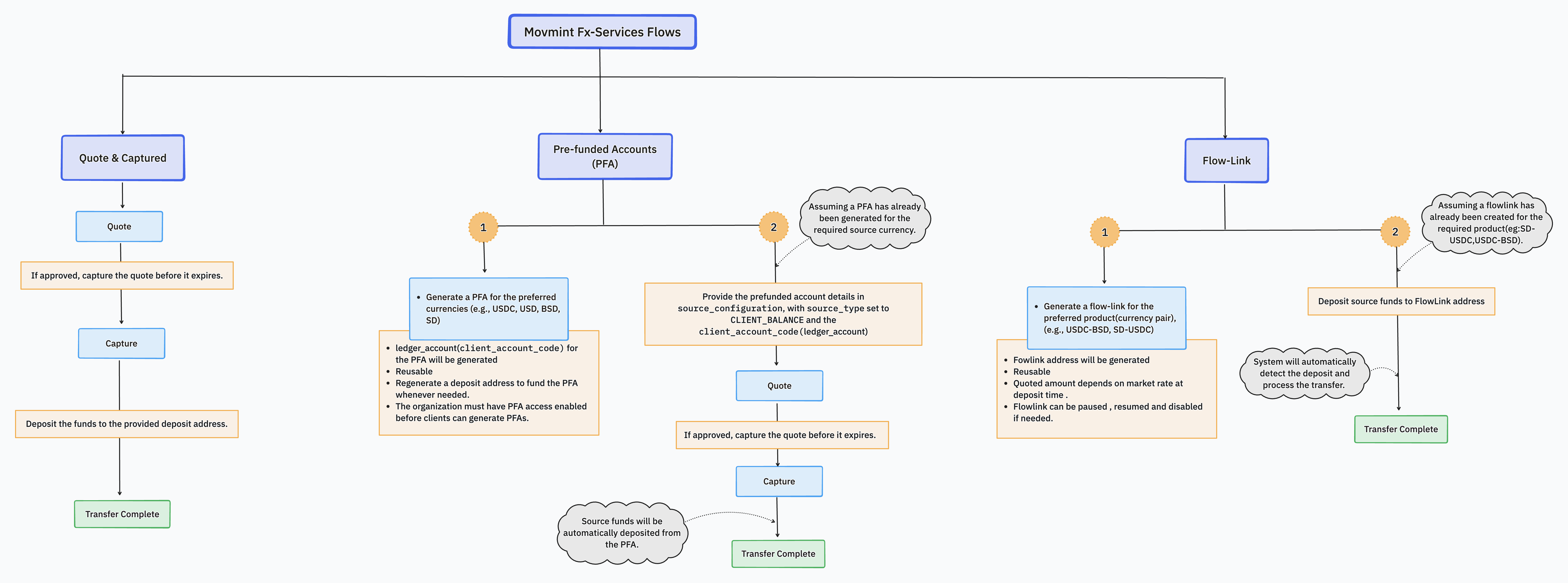
- Lock a rate with a two-step Quote & Capture flow, automate conversions with FlowLink straight-through processing, or pre-position liquidity with Prefunded Accounts.
- Quote & Capture - request a rate quote, then explicitly confirm it before any money moves. The rate is locked at quote time, so you know exactly what you'll get before committing.
- FlowLink - create a persistent deposit address wired to a fixed conversion-and-delivery configuration. Every deposit that arrives is automatically converted at the current market rate and delivered to the pre-configured destination, with no per-transaction approval needed.
- Prefunded Accounts - hold a balance on the Movmint ledger and use it as the source or target of a conversion for instant settlement.
All access is authenticated with OAuth 2.0 and scoped to your organization. Every request is screened for compliance, and every transaction is recorded on the Movmint ledger for audit and reconciliation.
The onboarding journey
Getting to production is a guided, four-stage process. Each stage has its own page in this section.
| Stage | What happens | Outcome |
|---|---|---|
| 1. Business Onboarding | Movmint Compliance and Business Development collect your company information, KYB documents, and intake forms, and provision your Product subscription. | Approved corridors and a Sandbox-ready account. |
| 2. Technical Onboarding to Sandbox | You provide your company name, address, phone number, and tax ID. Movmint issues your Sandbox client_id and client_secret. | API credentials for the Sandbox environment. |
| 3. Sandbox Test | A scripted, guided test session (conducted over the phone with Movmint) verifies your integration pattern end to end. | Verified integration. |
| 4. Production | Once Sandbox testing is signed off, Movmint provisions Production credentials and moves you to the live environment. | Live access to Movmint FX Services. |
Environments
Movmint operates two environments. They are functionally identical; Sandbox runs against test networks and never settles real funds.
| Environment | Base URL | Networks |
|---|---|---|
| Sandbox | https://api.sandbox.movmint.io | Testnets (Ethereum Sepolia, Base Sepolia, Bitcoin testnet3) |
| Production | https://api.movmint.io | Mainnets |
Base URLEvery endpoint in this documentation is relative to the environment base URL above. For example, the token endpoint is
POST https://api.sandbox.movmint.io/oauth2/tokenin Sandbox.
How a typical integration works
- Authenticate. Use the
client_idandclient_secretissued during Technical Onboarding to obtain a bearer token. See Authentication & Authorization for the full guide and code examples. - Choose a flow.
- Quote & Capture — request a quote, then capture it to lock the rate and execute. Best for interactive, user-approved conversions.
- FlowLink — create a persistent deposit address that automatically converts and delivers any deposit at the market rate. Best for hands-off, recurring flows.
- Prefunded Accounts — hold a balance on the Movmint ledger and use it as the source or target of a conversion for instant settlement.
- Reconcile. Use the transaction-history endpoints and the
transaction_idreturned by each operation to reconcile against your own ledger.
Start with Business Onboarding, or if you already have Sandbox credentials, jump straight to Authentication & Authorization and make your first call.
Updated about 1 month ago